What is Single Sign-On (SSO)?
Single Sign-On (SSO) allows you to log in to your 444Hosting billing account through third-party applications without needing to enter your credentials each time. This feature is convenient because it saves time and streamlines access to your account.
However, if you’re sharing access to any third-party applications, and you don’t want others to have access to your billing account, you may want to turn off SSO for security reasons.
How to Disable Single Sign-On (SSO) for Your Account
Follow these simple steps to disable Single Sign-On for your 444Hosting account:
Log in to Your 444Hosting Account:
Go to the 444Hosting website and log in to your client area.
- Go to Account Security:
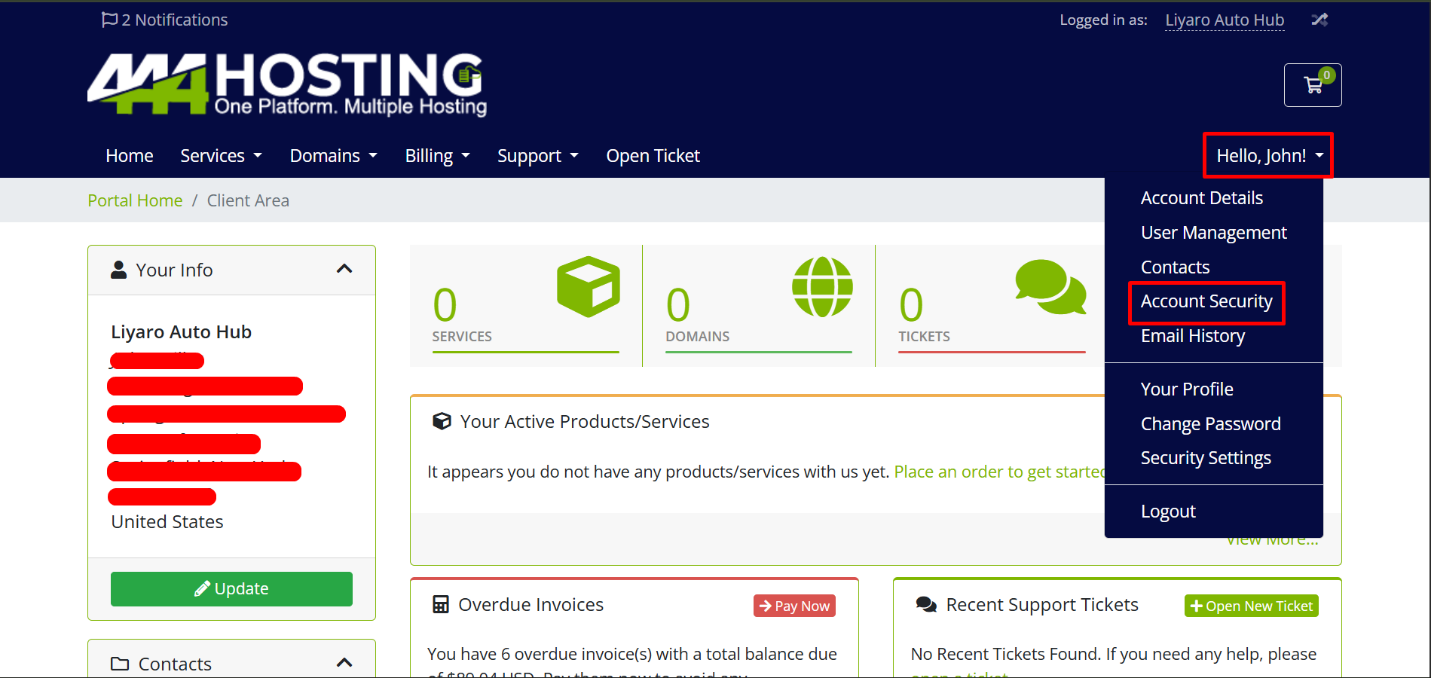
Once logged in, navigate to the “Account Security” section of your account. You can do this by clicking on the following link: Account Security
Find the Single Sign-On Section:
- In the Account Security, there is a section titled “Single Sign-On.”
Disable Single Sign-On:
- If Single Sign-On is currently permitted, you will see an option to disable it. Click on the button or checkbox to turn off Single Sign-On for your account.
- After disabling Single Sign-On, ensure that your changes have been saved. This will prevent third-party applications from automatically accessing your billing account.
Why Disable Single Sign-On?
- Increased Security: If you share access to third-party applications with others, disabling SSO prevents unauthorized users from accessing your billing account.
- More Control: You will need to log in manually each time, ensuring that only authorized users can access your account.
That’s it! You have now successfully managed your Single Sign-On settings for your 444Hosting account. If you ever want to enable it again, you can follow the same steps and re-enable SSO.